Users and access › Sign-up and profiles gathers what users can do themselves: create their mailbox, change their name, create secondary addresses, delete their account. The picker top right sets the whole instance or a single domain.
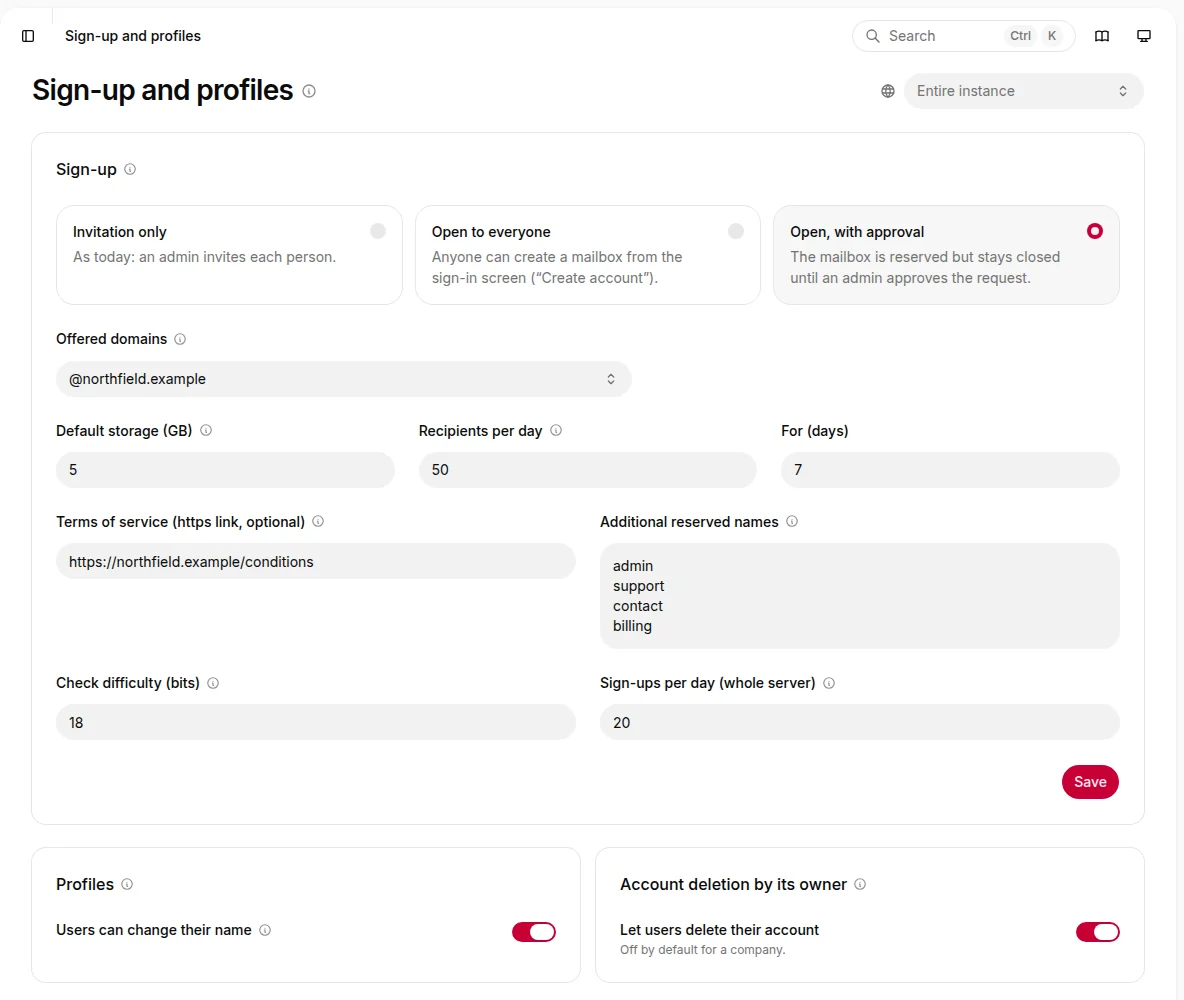
Sign-up
Three modes:
| Mode | Effect |
|---|---|
| Invitation only (default) | an admin invites each person (Users) |
| Open, with approval | anyone requests a mailbox from the sign-in screen ("Create account"); the mailbox is reserved but closed until an admin approves the request |
| Open to everyone | anyone creates their mailbox from the sign-in screen |
With open sign-up, set:
- Offered domains, among the server's mailbox domains;
- Default storage (GB) of each new account (changeable later account by account: ⋯ › Storage… menu);
- Recipients per day and For (days): a new account only writes to that many recipients per 24 hours during its first days, and adds no device (IMAP, SMTP) before that period ends (0 days: no limit);
- Sign-ups per day (whole server), on top of 3 per hour and 10 per day per IP address;
- Check difficulty (bits): a computation done by the browser, with no third-party service, that slows robots down (16 bits: one to two seconds; each extra bit doubles the time);
- Additional reserved names, one per line (admin, postmaster, abuse, support, no-reply… are always refused);
- Terms of service: an
httpslink; when set, a checkbox becomes mandatory.
Requests to approve appear in Sign-up requests, here and at the top of the Users page: Approve, Approve selected or Deny.
For a service open to the general public on your domain, with plans: Public service and plans.
Profiles
Users can change their name: otherwise, name changes are reserved for administrators (Rename… on the Users page).
Account deletion by its owner
Let users delete their account: off by default for a company, always allowed in a public service, never for an admin. Details: Account export and deletion.
Secondary addresses
Users can create secondary addresses (Settings › Accounts in the mailbox), up to Addresses per user (0 to 50; deleted addresses do not count). When off, nobody creates new ones; existing ones keep receiving. A limit specific to one account is set on the Users page (Addresses and aliases…).
Secondary address identities
Secondary addresses can have their own name, photo and signature: off by default, a secondary address sends under the account's name. The setting can also be opened for a domain (picker at the top of the page), an organization (its page) or a single person (Users › Edit role and access). Details: Aliases, filters and forwarding.
Anti-bot captcha
The Anti-bot captcha (Cloudflare Turnstile) card adds an anti-bot check to sign-up and sign-in. Create a widget on dash.cloudflare.com (Turnstile, "Managed" mode, your instance's hostname), then paste its site key and secret key: the secret key is encrypted and never shown again. The service verifies each answer with Cloudflare; the short browser check and the attempt limits stay in place. Without keys, the check is not required and a warning appears here and in "To do" on the dashboard. Remove the keys turns the captcha off.